Choosing strip light connectors in 2026 is less about picking the cheapest clip and more about matching it to the actual light strip. A connector that fits one model may fail on another. Check the strip’s width, voltage, number of copper pads, and whether it is single-color, tunable white, or RGB. Small details matter. An eight-millimeter strip with two contacts needs a different connector from a ten-millimeter RGB strip with four. Look closely at the cut marks, too; a connector cannot make a crooked cut behave like a clean one.
The installation environment matters just as much. For a dry cabinet shelf, a basic solderless connector may be practical. Near moisture or outdoors, check the connector’s sealing method and the strip’s protection rating, then follow the manufacturers’ installation guidance. Compare the specified current capacity with the strip’s load, and confirm polarity before powering it. A snug fit is reassuring, but it is not proof of a reliable electrical connection. Not always. For long runs, high loads, or tricky silicone-coated strips, soldering or a compatible pigtail may be the better choice. Test a sample connection before installing a full run; it can reveal flicker, weak contact, or an awkward fit. Product charts help, but they do not cover every imperfect cut or tight corner. This guide explains what to check, how connector types differ, and where a little extra care can prevent frustrating rework.
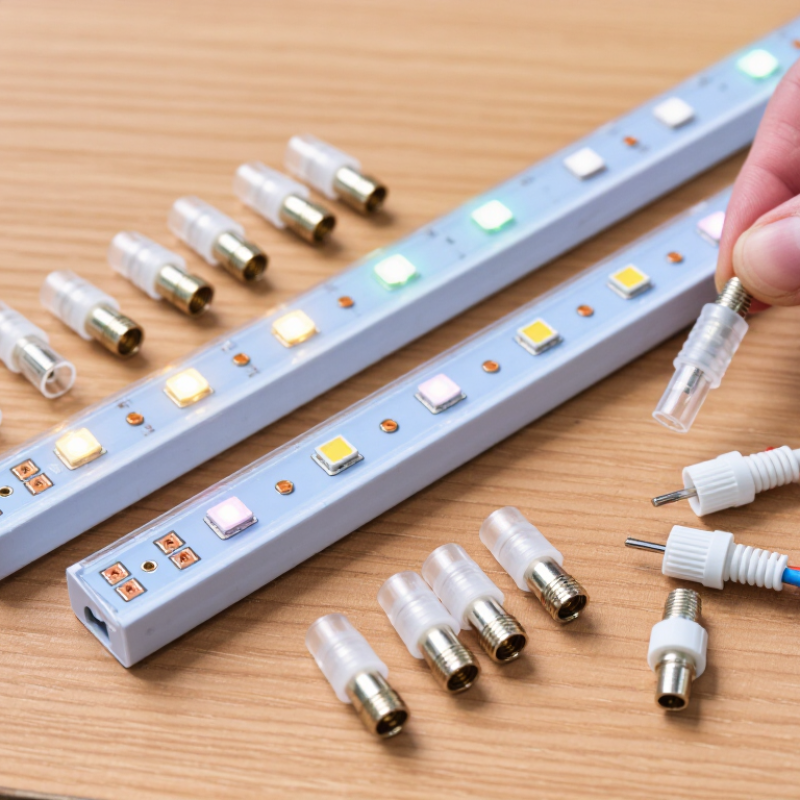
How to Choose Strip Light Connectors in 2026? Start by identifying the strip’s voltage, width, copper-pad layout, and channel type. A single-color strip usually has two pads; RGB commonly has four, while RGBW often has five. Match the connector’s pin count and width exactly. A connector that looks close may sit crooked and miss a copper pad.
Check the strip’s rated watts per meter and supply voltage before choosing a connector. Current equals total power divided by voltage. For example, a five-meter strip rated at 14.4 W/m draws 72 W: 6 A at 12 V, or 3 A at 24 V. The U.S. Department of Energy’s 2022 Solid-State Lighting R&D Opportunities report tracks LED efficacy in lumens per watt; for connector sizing, however, the strip’s W/m and voltage determine the current to carry. Also check the connector’s current rating and consider voltage drop, especially on long runs.
Tips: Read the strip’s label, then verify its pads with a ruler. Turn power off before connecting. I still test one short section first; small pad differences can make a “compatible” connector unreliable.
Choosing a strip light connector starts with the circuit board width, not the visible LEDs. A 10 mm strip may not sit securely in an 8 mm connector, even if the copper pads look close. Check the specified width and measure the bare board near a cut mark. The contact points should align with the connector’s metal pins.
Pin count must match the strip’s wiring. Two-pin connectors often suit single-color strips; three-pin designs may serve tunable-white or addressable strips, depending on their layout. RGB strips commonly use four pins, while RGBW strips often need five. Check the markings. Match labels such as +, R, G, B, and DATA, and verify their order. Two strips can share a pin count but use different pad layouts.
Match the connector shape to the installation: straight, corner, and extension connections require different configurations. Cut-point spacing can also limit where a joint fits. Keep connectors away from tight bends, and check voltage and current ratings before installation. Test a short section first. A snug fit does not prove good electrical contact; a slightly misaligned pad may cause flickering later. Do not force it. If the strip’s documentation is unclear, verify its pad pattern before choosing a connector.
How to Choose Strip Light Connectors in 2026?
Solderless connectors suit quick, low-voltage installs where strips are easy to reach. Match the connector to the strip’s width, pad layout, and copper thickness; a clip that nearly fits may create intermittent contact. Soldered joints take more skill but can provide a firm connection on clean, compatible pads. Too much heat can lift or damage them. For a gap between the strip and power supply, choose a wire-to-strip connector, then check its current rating and wire gauge. Keep polarity consistent. A neat fit is not proof of a reliable connection.
The U.S. Department of Energy’s 2020 U.S. Lighting Market Characterization estimated that LEDs made up about 48% of installed U.S. lighting stock. That growth makes dependable low-voltage connections increasingly relevant, but the report does not compare connector types. In practice, installation conditions matter: moisture, vibration, and frequent handling can change which connection is appropriate. I still test a sample first. A perfect-looking clip can flicker.
Tips: Clean the copper pads, confirm polarity, and power-test the joint before mounting the strip. For coated strips, check whether the connector is designed for that coating. If the connection feels loose, reconsider the match rather than forcing it.
Compare solderless, soldered, and wire-to-strip connections by the job you need them to do.
Higher scores indicate a better typical fit for each task, not a measured performance rating. Solderless connectors suit quick, tool-free joins; soldered joints suit custom, lasting connections when installed correctly; wire-to-strip connectors make it easier to route a wire lead away from the strip. Check strip width, pin count, voltage, and connector compatibility before buying.
How to Choose Strip Light Connectors in 2026?
Check Voltage, Current, Polarity, and Environmental Ratings
Match the connector’s voltage rating to the strip and power supply. A 24-volt connector is not a substitute for a 12-volt one. Check current capacity too: estimate the strip’s total wattage, then divide it by its voltage. Choose a connector rated above that current, with a sensible margin. Undersized contacts can warm up, especially in a long installation. Polarity matters. Align the positive and negative markings before connecting, and inspect the copper pads for dirt or damage.
Tips: Turn off power before fitting a connector. Check polarity twice. A quick test on a short, accessible section can catch a reversed connection before installation gets awkward.
Consider the location as carefully as the electrical ratings. For a dry room, an unsealed connector may be suitable. Near splashes or outdoors, select a connector and enclosure with an appropriate environmental rating; the rating applies only when installed as specified. Keep exposed contacts away from moisture. Also confirm the connector fits the strip’s width and pin spacing. Some strips look nearly identical, yet their pads differ. A snug fit is useful, but forcing one can damage the copper. I would still recheck the connection after the first few minutes of operation; small mistakes are easy to miss.
Choosing a strip light connector in 2026 is not only about matching its shape. Check the strip width, pin count, voltage, and connector type before buying. A single-color strip and an RGB strip may need different connections. Also confirm that the connector aligns with the strip’s marked cut line and polarity. Small details matter. A connector that looks right can still sit unevenly or leave copper pads exposed.
Tips: With power disconnected, press the strip fully into the connector and close its clip. Give the joint a gentle tug; it should stay seated without bending the strip. Then reconnect power and check for flickering, uneven brightness, or unusual warmth. Stop if anything seems off.
Test the connection before securing the lights under a shelf or inside a channel. That makes a loose joint easier to find and fix. Run the strip for several minutes, especially near a corner or other spot where the cable may pull. I’ve found that a quick visual check can miss a weak connection. And not every connector grips equally well, even when the specifications match. If the strip shifts during testing, try a compatible connector rather than forcing it.
| Strip Light Type | Typical Pin Layout | What to Check for Fit | Stability Test | Reliable Operation Check |
|---|---|---|---|---|
| Single-color LED strip | Typically 2 pins: positive and negative | Match the connector to the strip’s measured PCB width, pad spacing, and polarity. Common strip widths include 8 mm and 10 mm, but dimensions vary. | With power disconnected, close the clip fully and check that the strip sits straight and the contacts align with the copper pads. | Reconnect the correct power supply and confirm even illumination from end to end, with no flicker or intermittent operation. |
| Tunable-white (CCT) strip | Often 3 pins: one shared conductor and two color-temperature channels | Confirm the strip’s actual pad arrangement and connector width. Three-pin layouts are not universal, so match the printed polarity and channel markings. | Check that each contact lands on its intended pad and that the clip does not shift when the cable is moved gently. | Test both warm-white and cool-white channels separately, then verify that dimming or color-temperature control works as intended. |
| RGB strip | Commonly 4 pins: one shared conductor and red, green, and blue channels | Match the four-pad layout and verify whether the strip uses a common positive or common negative connection; do not assume polarity from pin count alone. | Inspect alignment across all four pads. A partially seated connector can leave one color channel disconnected. | Test red, green, blue, and white-mix output individually. Check for missing colors, flicker, or unexpected color changes. |
| RGBW strip | Commonly 5 pins: RGB channels plus a white channel and a shared conductor | Use a connector made for the strip’s five-pad layout and measured width. Check the white-channel position as well as the shared conductor. | Make sure all five contacts are seated evenly and the connector lid or latch is fully closed. | Test each color channel and the white channel separately, then test mixed output for stable brightness and consistent color. |
| Addressable LED strip | Often 3 or 4 pins, depending on the strip design; data direction is important | Match the exact power, ground, and data pad arrangement. Follow the strip’s input arrow or “DI” marking; pin count alone does not confirm compatibility. | Check that the connector holds the strip without covering or misaligning the data pad, and secure the cable against accidental strain. | Run a test pattern across the full strip. Confirm that pixels respond in sequence and that data does not drop out when the cable is gently moved. |
| Any strip with a solderless clip connector | Pin count must match the strip’s copper-pad layout | Check strip width, pad spacing, cut-line position, and connector compatibility with the strip’s PCB thickness. Trim only at marked cut points. | With power off, perform a gentle pull test on the cable and strip. The connection should remain seated without tearing or lifting the copper pads. | After installation, check for exposed conductors, excess heat, flicker, and voltage or polarity mismatch. Use a connector with a current rating suitable for the load. |
| Indoor or damp-location installation | Depends on the strip type and pin layout | For dry indoor use, an unsealed connector may be suitable. For damp or wet locations, the connector and enclosure must provide protection appropriate to the installation; an IP rating applies to the assembled product, not automatically to an exposed joint. | Check that seals, end caps, and cable entries are seated as designed. Do not rely on a clip alone to make a joint waterproof. | Follow the connector manufacturer’s installation instructions and keep the connection protected from moisture, condensation, and direct water exposure unless it is specifically rated for those conditions. |